It’s the back end of a long day, and this is not your first set of workpapers. You pull the account transactions report and there it is again: a couple of hundred lines of coffee, subscriptions, and stationery, nearly all fine, with maybe one that isn’t sitting somewhere in the middle. You read down it anyway, because that one line matters. By the fortieth file in a row, though, your eyes are doing the reading and your brain has clocked off.
Every accountant knows the transaction that slips through. The personal expense coded to office supplies, or the capital purchase buried in repairs. Obvious in hindsight, and invisible at 5pm on a Friday. Catching it was never the hard part. Staying sharp enough to catch it, file after file, is.
That’s the job we’re handing to an AI agent in our next workpaper release. Not to replace your judgement, but to give you a second set of eyes on every line, so you spend your time on the transactions that actually need an accountant. This walkthrough follows the whole flow, from the workpaper you already use to the analysis that lands back in your sheet.
It starts where you already start
You open a workpaper, set your balance date, and connect to Xero. RadiusCore pulls your general ledger in as a trial balance, then scans your chart of accounts and tells you which workpapers you need. Nothing new so far. This is how RadiusCore workpapers already run.
The new workpapers add two things. The first is a short on-worksheet checklist, tucked behind a button, to guide the review for that account. The second is the sub-ledger detail. Press “Populate from Xero” and the account transactions report flows straight into your sheet, matched against the general ledger with a green tick when it reconciles. No exporting, no reformatting.
One button: Analyse with AI
Once your detail is in, there’s a single button at the top of the workpaper: Analyse with AI.
Press it, and RadiusCore packages up three things and sends them to your AI agent:
The sub-ledger detail for that account
The workpaper checklist
The relevant legislation
The AI reviews each transaction and writes its analysis straight back into the workpaper.
You don’t leave Excel at any point. Everything happens inside the workbook.
What lands back in your sheet
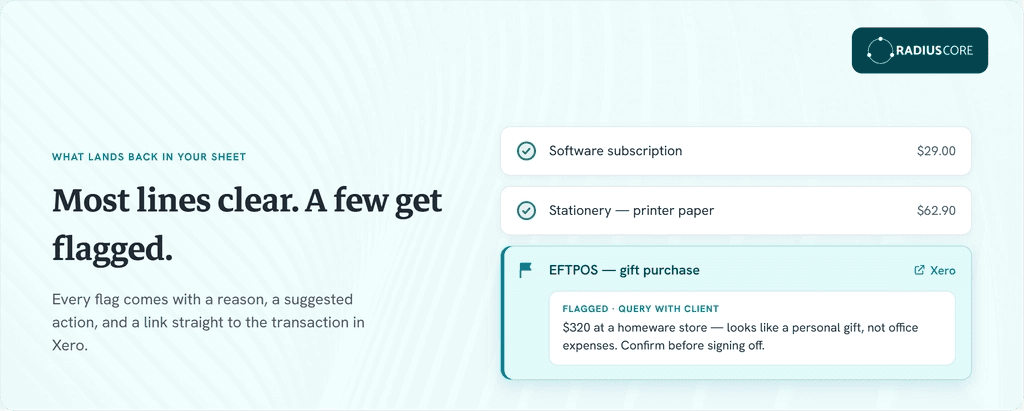
The analysis appears in the workpaper, line by line. Most transactions get cleared as expected activity. The ones worth a closer look get flagged, and each flag comes with:
A colour code, so it stands out in the sheet
A short note on why it was picked up
A suggested follow-up action
A hyperlink straight to that transaction in Xero
Say you run it on an office expenses account. It might clear the bulk of the lines and flag three:
A payment that looks like a personal gift, to query with the client
A credit note to verify
A laptop purchase big enough to check
On a legal fees account, it might flag a cost tied to a shareholding change and suggest confirming whether it needs to be capitalised. The proof sits right there in the workpaper, next to your workings.
How it decides what to flag
Two things drive the review:
The checklist, sent along with the data, which points the AI at the things accountants often need to check on that account
A structured set of review instructions we pass in the background, which keeps the analysis consistent in both what it looks for and how it writes it up
Both are things we can tune. If firms tell us an account needs a sharper checklist, we adjust it.
Recode something? Run it again
Workpapers change as you work. You recode a transaction, post a year-end journal, tidy up a coding error. RadiusCore refreshes your balance verification on demand, but it deliberately leaves the sub-ledger detail alone, so if a balance stops reconciling you get a red cross and know to go back in.
When you do, you repopulate the sub-ledger from Xero and rerun the analysis. There’s no limit on that, so run it as many times as you need. And you choose which workpapers to run it on, so you’re not analysing every account for every client by default.
Your tenancy, your AI, your data never leaves
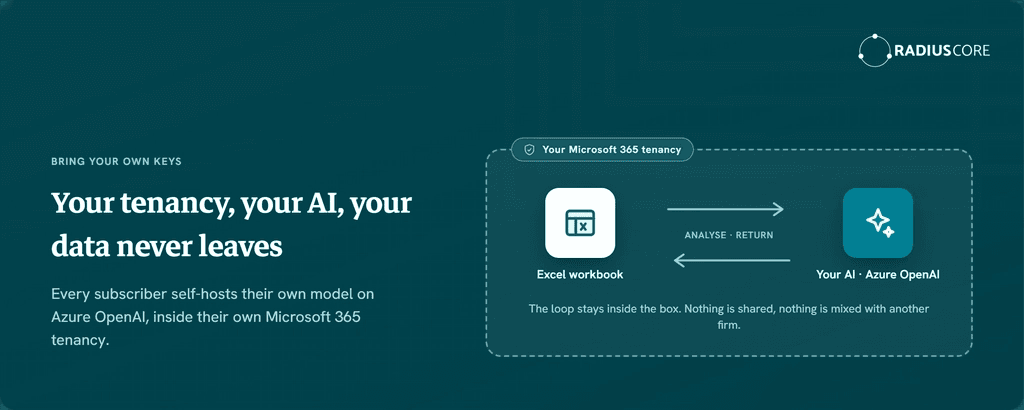
This is the part we’ve been most deliberate about. The feature is a bring-your-own-keys setup. Every subscriber self-hosts their own AI model, running on Azure OpenAI, the same trusted infrastructure behind Microsoft Copilot, inside their own Microsoft 365 tenancy. Firms on RadiusCore already run Xero for client data and Microsoft 365 for email and files, so the tenancy is already there.
In practice, your data flows from your workbook to your model and back again, and never leaves your Microsoft 365 environment. It isn’t shared anywhere, and it isn’t mixed with any other subscriber’s data. You control where it lives, and because of how we’ve built it, we can add support for other models down the track.
What it costs and what it takes to set up
There’s a one-time setup, and it runs in two steps:
Provision an Azure OpenAI resource inside your tenancy. Most firms will want their IT team to help with this.
Give RadiusCore secure, encrypted access credentials through the app, so we can send data to your resource and bring the analysis back.
The resource costs nothing to sit there until you use it. After that, cost depends on how much you send and which model you pick. In our testing, analysing 15 to 20 lines came in around 1 cent, and you can set spend limits in Azure so nothing blows out.
What’s in the first release
Here’s what the first release covers:
Four workpapers to start, plus a sundry workpaper you can duplicate for any account you like
Both our New Zealand and Australian versions
More than one general ledger code in a single workpaper, if you need it
It’s Xero-first. The analysis needs the sub-ledger detail we can only pull from Xero, so it runs on Xero-connected accounts. It also works best with clean data, since it leans on the transaction detail, including bill descriptions, alongside everything we send in the background. Good bookkeeping in, better analysis out.
Get set up before it lands
AI analysis is launching soon, and it’s the first step, not the finished picture. We’ll be rolling it out across more workpapers over time, and firm feedback will steer where it goes next.
The setup takes a little time, so if you want to run it on day one, join the waitlist and we’ll send the setup instructions so you can have your Azure resource ready to go.