Run an AI tool over a set of accounts, and you get an answer back. The harder question is what happens to that answer after you’ve read it.
Most AI tools hand you a response in a chat window. You read it, you act on it, or you ignore it, and the response disappears when you close the tab. That’s fine for drafting an email. For compliance work, it creates a gap, because the reviewer who opens your file next week sees the outcome of your thinking with no way to tell what informed it.
An AI pass over a workpaper is worth having only if it leaves something behind.
Why the record matters more than the flags
A workpaper exists to prove a balance. It shows what the figure is, where it came from, how it was checked, and what you concluded. Every part of that is evidence, and evidence has to be visible to the next person.
Bring an AI tool into that file and it becomes part of how the balance was checked. So it needs to meet the same standard as everything else in there. A reviewer should be able to see it happened, see what it looked at, and see what the preparer did about it.
Put it the other way around. Your manager asks whether the depreciation schedule was reviewed. You say the AI checked it. They ask what it found. You say it came back clean, as far as you can remember, though that was three weeks ago and the numbers have moved since.
That exchange is the whole problem. The check happened, and the file has no idea it did.
Four things worth recording

When an AI pass runs over a workpaper, four things are worth having in the file afterwards.
Who ran it. The same reason sign-off is attributed to a person. Someone chose to run it and read the output.
What data it saw. GL data moves. An analysis run against the ledger as it stood on the 3rd tells you about the 3rd. If the trial balance changed on the 10th, the reviewer needs to know which version was looked at.
What it flagged. In full, including the items the preparer decided were immaterial. An AI pass that only records its unresolved flags hides the judgement calls, and the judgement calls are the interesting part of any file.
What happened next. Each flag either got actioned, explained, or set aside for a reason. Writing that down saves the reviewer from chasing something the preparer already thought about.
Those four together turn an AI pass from an opinion into part of the audit trail. It sits next to the digital signatures and the working, and it’s readable by anyone who opens the file.
Where should the analysis actually run?
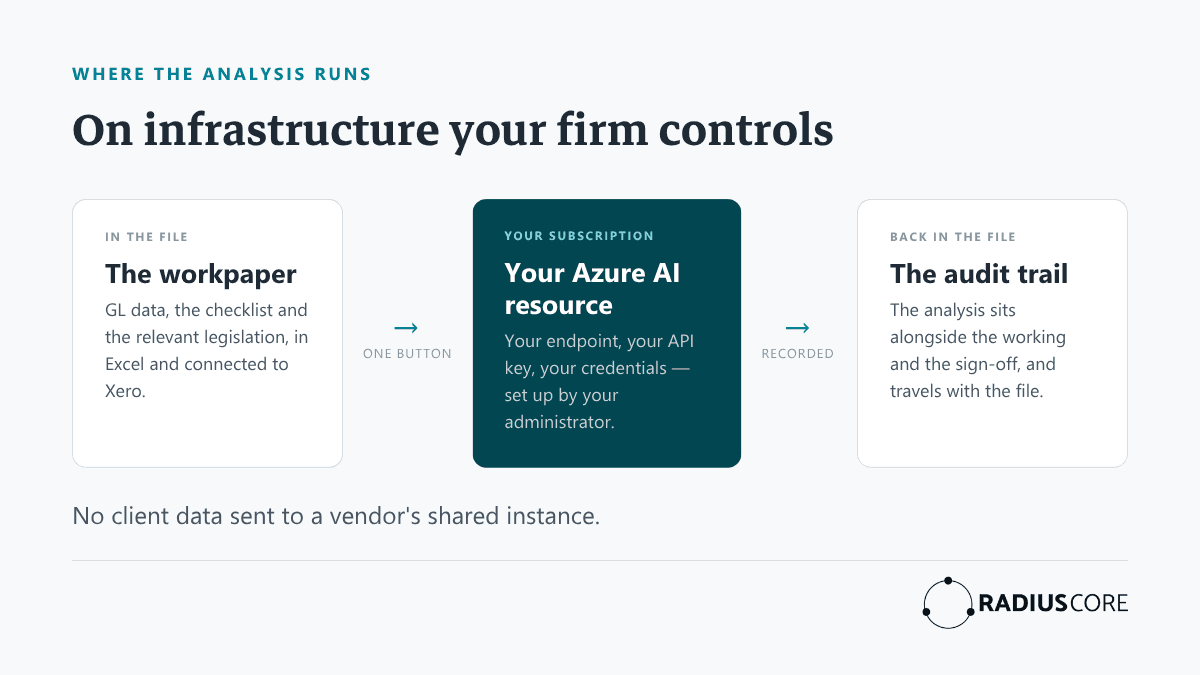
The other question accountants ask, usually before any of the above, is where the client data goes.
It’s a fair thing to ask. A workpaper holds a client’s entire general ledger. Sending that to a service you know very little about, on terms you had no part in setting, is a decision that deserves more thought than clicking a button.
The answer worth insisting on is that the analysis runs on infrastructure your firm controls. Your Microsoft subscription, your Azure AI resource, your credentials. The data goes to a service you already pay for and already have an agreement with, rather than to a vendor’s shared instance.
In practice, that means your administrator sets it up rather than the software vendor. They supply the endpoint, the API key and the deployment name for your own AI resource, test the connection, and switch analysis on for the practice. If the credentials fail validation, nothing runs. If the credentials fail validation, nothing runs.
That’s a slightly slower start than a tool you can switch on in a click. It’s also the version a partner can sign off on.
What it decides, and what you decide
Worth being plain about the limits. An AI pass reads the transactional data for one workpaper, the checklist for that workpaper, and the relevant legislation, then tells you what looks worth a second look.
It flags. Your team decides. A flag is a prompt to check something, and a clean run is a reason to move faster rather than a reason to stop thinking. The preparer still signs, the manager still reviews, and the partner still carries the file.
Which is the point of recording what happened. The AI’s contribution is one input among several, and the file should show it as exactly that.
Where RadiusCore fits
RadiusCore Workpapers are built in Excel and connected to Xero, with digital signatures and review recorded in the file itself. AI Analysis is the newest layer.
There’s a button on each workpaper tab. Press it and RadiusCore sends that tab’s GL data, the checklist for the workpaper, and the relevant legislation to your firm’s own AI resource. The analysis comes back into the workpaper, in the file, alongside the working and the sign-off. Configuration sits with your administrator, in the Administrator Dashboard, using your own credentials.
So the record travels with the file. When someone picks it up in eighteen months, the analysis is there with everything else.
Workpapers sit on top of an Excel Add-in subscription, which starts at $75/month with a 30-day free trial.
See it in your own file
There’s a quick way to test where your own files sit. Open a workpaper someone else on your team finished last month and see how far you get without messaging them. Wherever you stall is a point where the file stopped recording its own work.
An AI pass is worth adding once the layers underneath it hold up. A live link to the ledger, working that traces back to the trial balance, sign-off that records who checked what. Get those right, and an analysis that writes itself into the file becomes another piece of evidence rather than another thing to take on faith.