
Documentation
Read our guide for step-by-step instructions, best practices, and tips to get the most out of RadiusCore.
Search
Installation Guide
User Documentation
Administrator Documentation
API Documentation
Workpapers
Change Log
Antivirus Issues
In some rare instances, anti-virus software may detect RadiusCore as a virus. This is a false positive, RadiusCore does not contain any malicious software. If your anti-virus does flag RadiusCore.xlam as a virus, please add an exception for this file. Instructions for how to do so for Windows Defender (the default Windows anti-virus software) are below.
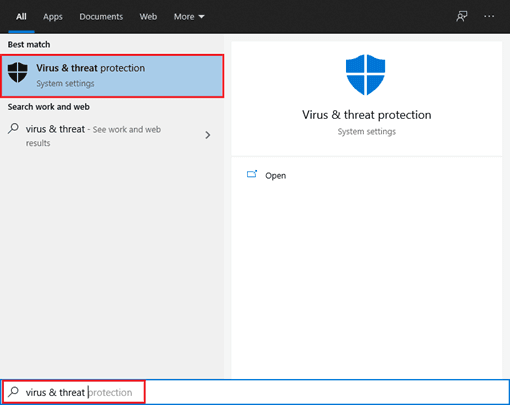
Access Virus & threat protection by searching in Windows, or via the Windows setting menu.
Select Manage Settings, then on the next screen, scroll down and select Add or remove Exclusions.
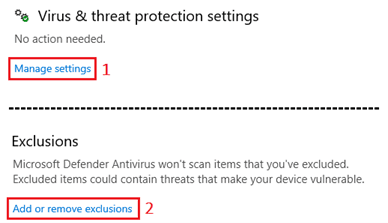
Add the following exceptions:
Per-User install:
Folder exclusion:
C:/Users/%USERNAME%/AppData/Local/RadiusCoreFile exclusion:
C:/Users/%USERNAME%/AppData/Local/RadiusCore/RadiusCore.xlam.
Per-Machine install:
Folder exclusion:
C:\Program Files (x86)/RadiusCoreFile exclusion:
C:\Program Files (x86)/RadiusCore/RadiusCore.xlam.
Re-install RadiusCore to replace the file that was deleted/quarantined by the anti-virus software.
Enquire Now
Reach out to the team at RadiusCore to see how we can help you.

Get our Xero app
Our add-in provides a two-way data transfer between Xero online applications and desktop Microsoft Excel.

Have questions?
Reach out to our support team for quick answers, product guidance, or help getting started with RadiusCore.
© 2025 RadiusCore. All rights reserved.