
Documentation
Read our guide for step-by-step instructions, best practices, and tips to get the most out of RadiusCore.
Search
Installation Guide
User Documentation
Administrator Documentation
API Documentation
Workpapers
Change Log
Microsoft .NET Framework 3.5
While RadiusCore does not strictly require .NET Framework 3.5, sometimes having it available can help with platform compatibility. If you are having issues using RadiusCore, please follow these steps to install .NET Framework 3.5:
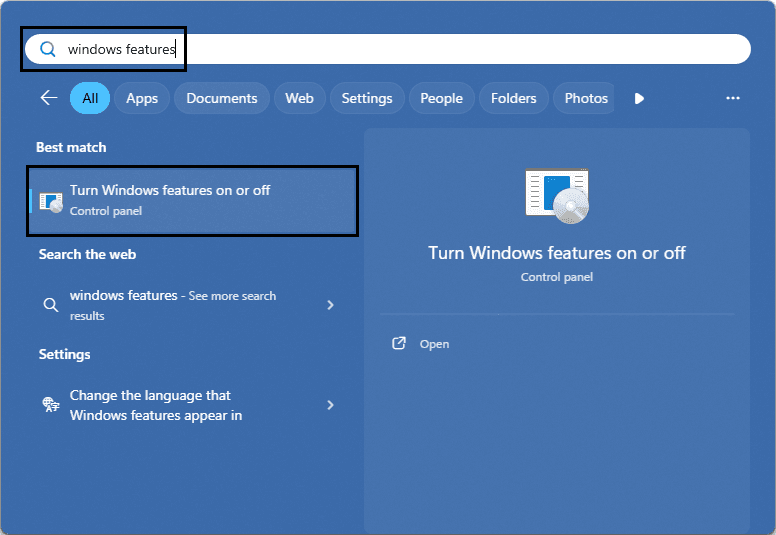
Access Windows Features by searching in Windows or via the control panel.
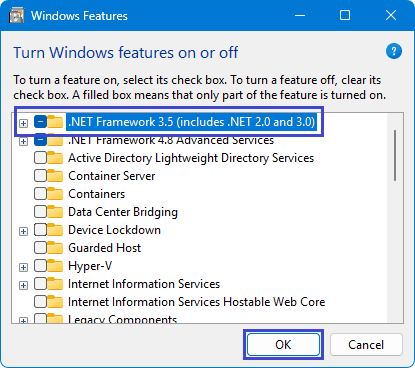
Ensure the box for .NET Framework 3.5 is filled in (as pictured below). If it is then you already have .NET Framework 3.5 installed. If it is not, press the box to fill it in and press OK. Windows will ask to download and install some files, agree, and wait until the installation is complete.
Enquire Now
Reach out to the team at RadiusCore to see how we can help you.

Get our Xero app
Our add-in provides a two-way data transfer between Xero online applications and desktop Microsoft Excel.

Have questions?
Reach out to our support team for quick answers, product guidance, or help getting started with RadiusCore.
© 2025 RadiusCore. All rights reserved.