
Documentation
Read our guide for step-by-step instructions, best practices, and tips to get the most out of RadiusCore.
Search
Installation Guide
User Documentation
Administrator Documentation
API Documentation
Workpapers
Change Log
RadiusCore Repeatedly Disappears from the Excel Ribbon
Sometimes RadiusCore will disappear from the Excel ribbon each time you close & open Excel. One possible reason for this is that the RadiusCore install folder was not correctly registered as a Trusted Location. To verify it is correctly registered, and manually register it if required, see the steps below.
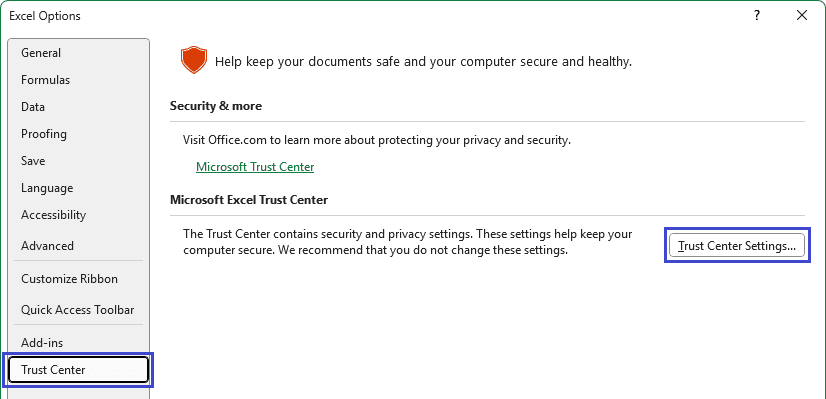
In Microsoft Excel, select File ➔ Options ➔ Trust Center ➔ Trust Center Settings.
Select Trusted Locations, then check the list to see if
C:\Users\%USERNAME%\AppData\Local\RadiusCoreis in the trusted locations list. If it is not, add the folder using the Add new location option.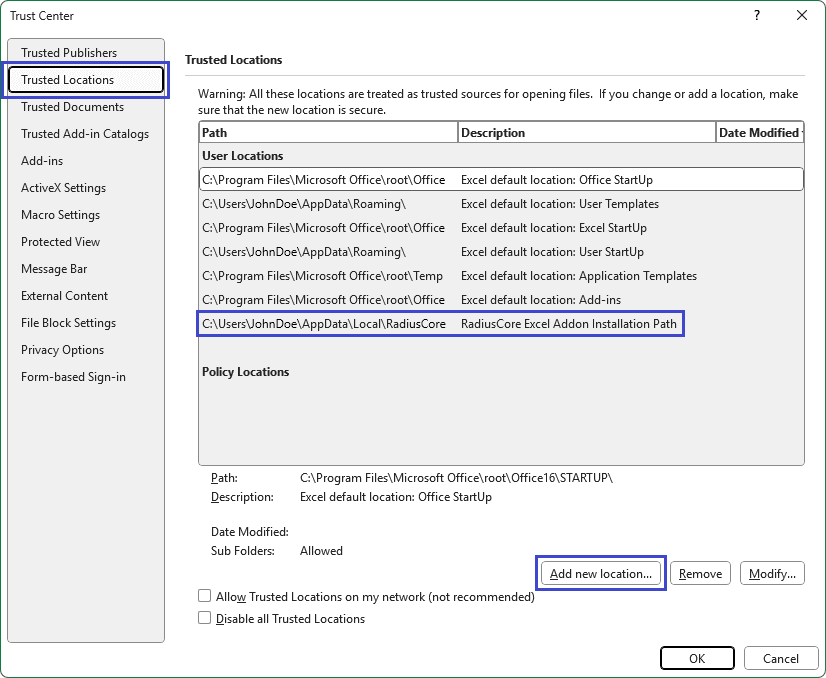
Enquire Now
Reach out to the team at RadiusCore to see how we can help you.

Get our Xero app
Our add-in provides a two-way data transfer between Xero online applications and desktop Microsoft Excel.

Have questions?
Reach out to our support team for quick answers, product guidance, or help getting started with RadiusCore.
© 2025 RadiusCore. All rights reserved.